









Call of Duty®: Mobile


Installs
100M+Category
CompetitiveContent Rating
Mature 17+
Screenshots





Editor's Review
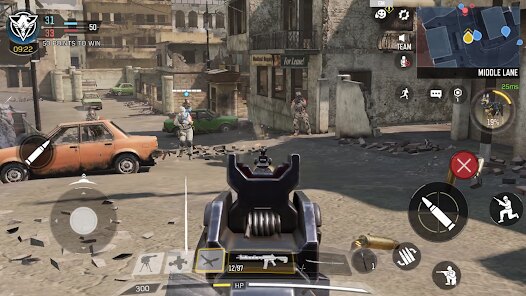
Call of Duty: Mobile brings the famous shooter series to phones. It's a free game where you play in fast matches. You can choose team battles or solo fights. The game feels smooth and looks good on mobile. It has many maps and modes from older Call of Duty games. This makes it fun for both new and old fans. You shoot enemies, complete objectives, and try to win. The controls are made for touch screens. You move with a virtual joystick and aim by touching. It might feel hard at first, but you get used to it quickly.
Starting the game is easy. You download it, make an account, and play the tutorial. The tutorial teaches you how to move, shoot, and use skills. After that, you can jump into real matches. The main screen shows your profile, friends list, and different game modes. You can play Multiplayer with small teams or Battle Royale with 100 players. There are also limited-time events. You earn experience and level up. As you level up, you unlock new guns, characters, and items. You can customize your soldier and weapons with different looks.
The game has in-app purchases. You can buy a battle pass, which gives you rewards as you play. You can also buy COD Points to get special weapon skins and characters. These purchases are optional and do not make you much stronger. The game also shows ads, but only for its own events or new content. It does not have video ads that interrupt your matches. You can download Call of Duty: Mobile on both the Google Play Store and the Apple App Store. It is a complete and fun shooter for mobile, offering a lot of content without needing to pay.
Questions You Might Have
Is Call of Duty: Mobile hard to play on a phone?
It can be tricky at first because shooting games need good control. The game has customizable buttons and sensitivity settings. You can change the layout to fit your fingers. After a few matches, most players find it comfortable and fun to play.
How do I download Call of Duty: Mobile?
You can get it for free. Just go to the app store on your phone. If you use an Android phone, open the Google Play Store. If you use an iPhone, open the App Store. Search for "Call of Duty: Mobile" and tap install. The game is quite large, so make sure you have space and a good internet connection.
Does the game have annoying ads?
No, it does not have pop-up video ads or banners during matches. The only "ads" you see are for the game's own events, new seasons, or special offers. These are shown in the menus and do not interrupt your gameplay.
Do I need to spend money to win?
No, spending money is not necessary to win. The in-app purchases are mostly for cosmetic items like weapon skins and character outfits. The guns you can buy with real money are not more powerful than the guns you unlock for free by playing. Skill and practice are much more important.
Can I play with my friends on different phones?
Yes, you can. Call of Duty: Mobile supports cross-platform play. This means if your friend has an iPhone and you have an Android phone, you can still team up and play together. You just need to add each other using your Activision ID or username in the game.
Download Apk File
Disclaimer
1 . Zebratests does not represent any developer, nor is it the developer of any App or game.
2 . Zebratests provide screenshots, historical version Apk, links and other information, which we collected from Google Play. We will also add our own reviews to provide users with more information to choose.
3 . All trademarks, registered trademarks, product names and company names or logos appearing on the site are the property of their respective owners.
4 . Zebratests abides by the federal Digital Millennium Copyright Act (DMCA) by responding to notices of alleged infringement that complies with the DMCA and other applicable laws.
5 . We guarantee the security of apk files downloaded from our site and also provide the official download link at Google Play Store and App Store.
6 . If you are the owner or copyright representative and want to delete your information, please contact us [email protected].
7 . All the information on this website is strictly observed all the terms and conditions of Google Ads Advertising policies and Google Unwanted Software policy.