













Cover Fire: Offline Shooting


Installs
100M+Category
OfflineContent Rating
Rated for 18+
Screenshots

Editor's Review
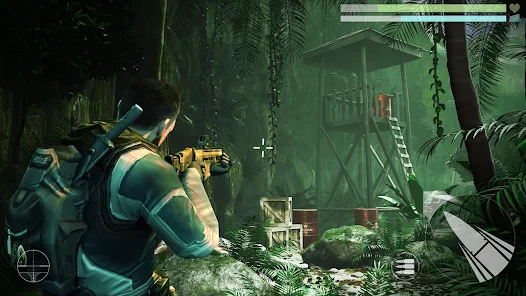
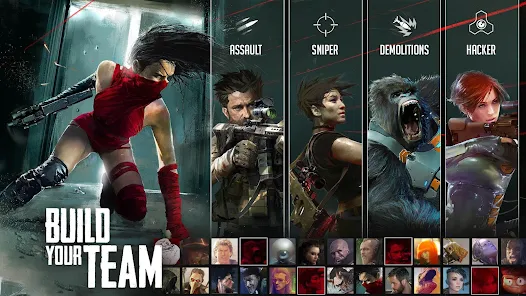
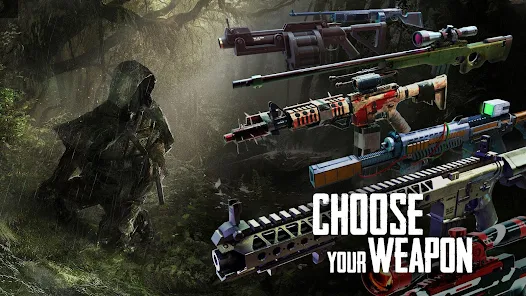
Cover Fire: Offline Shooting is a fun action game where you shoot enemies. You play as a soldier in different missions. The game is easy to start. You just tap to shoot and swipe to move your aim. The controls are simple and good for new players. The main screen shows your missions and your team. You can see your weapons and upgrades there. The game has many types of guns like rifles and snipers. You can make your guns better with upgrades. You also collect heroes to join your team. Each hero has a special skill to help in battle. The game has in-app purchases. You can buy gems and coins with real money. These help you get new items faster. The game does have ads. You watch ads to get free rewards or extra tries. You can play Cover Fire on both Google Play and the App Store. It is a free download. Many people enjoy Cover Fire for its exciting missions. The action feels fast and the graphics are nice. You fight in cities, deserts, and jungles. The enemy AI is smart, so you need good cover. The sniper missions are very popular. You must wait for the perfect shot. The game saves your progress, so you can stop anytime. It is a great game for short play sessions. You can complete a mission in a few minutes. Cover Fire is perfect for action fans who like shooting games.
In Cover Fire, the gameplay is about using cover well. You tap behind walls or barrels to hide from bullets. Then you pop out to shoot enemies. This mechanic is the core of the game. It makes you think about positioning. The missions have different goals. Sometimes you protect a person, other times you destroy a vehicle. The variety keeps the game fresh. You earn cash and gems after each mission. Cash is used for weapon upgrades. Gems are for buying new heroes or special crates. The upgrade system is deep. You can improve damage, reload speed, and magazine size. This gives you a reason to replay missions for more cash. The hero system adds strategy. You choose which hero to bring on a mission. Some are better for close combat, others for long range. You must match the hero to the mission type. The game is very generous with free rewards. You get login bonuses and daily missions. This helps players who do not want to spend money. The ads are optional for the most part. You only watch them if you choose to for a bonus. The game runs smoothly on most phones. The offline play is a big plus. You can enjoy Cover Fire anywhere without internet.
Cover Fire: Offline Shooting offers a complete package. It has a long story mode with many chapters. Each chapter has several exciting missions. The difficulty increases slowly, which is fair. Boss fights are a highlight and require good strategy. Besides the story, there are special events. These events give unique rewards and challenges. The PvE content is plentiful. The game does not have a PvP mode, which some players might miss. The focus is purely on fighting AI enemies. The sound and music are good and fit the action theme. The developers update the game with new content sometimes. This includes new weapons, heroes, and missions. The community around Cover Fire is active. Players share tips online. For a free mobile game, it has a lot of quality. The in-app purchases are not forced. You can finish the game without paying, but it will take longer. The ads are manageable and not too intrusive. Overall, Cover Fire is a top choice for offline action games. It is easy to learn but has depth for those who want it. The game is available worldwide on both major app stores. If you like shooting games, you should try Cover Fire: Offline Shooting.
Questions You Might Have
Is Cover Fire: Offline Shooting hard to play?
No, it is not hard. The controls are simple tap and swipe. The first missions teach you everything. The game gets harder slowly, so you have time to learn. It is good for beginners and experienced players.
Can I play Cover Fire without spending money?
Yes, you can. The game gives you many free rewards daily. You can earn all weapons and heroes by playing. Spending money just makes progress faster. It is very possible to enjoy the whole game for free.
How do I download Cover Fire?
Go to the Google Play Store on Android phones or the App Store on iPhones. Search for "Cover Fire: Offline Shooting". Tap the install button. The game is free to download. Make sure you have enough storage space on your device.
Does the game have too many ads?
The ads are mostly optional. You watch ads only if you want a bonus reward or an extra life. You can play all missions without seeing a single ad. The ads are not forced during gameplay, so they are not too annoying.
What can I buy with real money in the game?
You can buy gems and coin packs. Gems are used to get new heroes or open special crates. Coins are used to upgrade your weapons. There are also special offers that bundle items together. Purchases are not needed but can help if you are stuck.
Download the App
Disclaimer
1 . Zebratests does not represent any developer, nor is it the developer of any App or game.
2 . Zebratests provide screenshots, historical version Apk, links and other information, which we collected from Google Play. We will also add our own reviews to provide users with more information to choose.
3 . All trademarks, registered trademarks, product names and company names or logos appearing on the site are the property of their respective owners.
4 . Zebratests abides by the federal Digital Millennium Copyright Act (DMCA) by responding to notices of alleged infringement that complies with the DMCA and other applicable laws.
5 . We guarantee the security of apk files downloaded from our site and also provide the official download link at Google Play Store and App Store.
6 . If you are the owner or copyright representative and want to delete your information, please contact us [email protected].
7 . All the information on this website is strictly observed all the terms and conditions of Google Ads Advertising policies and Google Unwanted Software policy.