







Pokémon GO


Installs
100,000,000+Category
AdventureContent Rating
Rated for 7+
Screenshots
Editor's Review
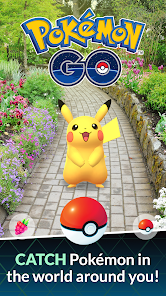
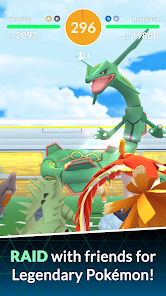
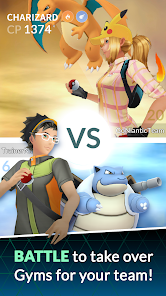
Pokémon GO is a mobile game that uses your phone's GPS and camera. You walk around in real life to find and catch Pokémon. The game shows a map of your area. Pokémon appear on the map. You tap on them to try and catch them. You use Poké Balls to catch them. The game is very easy to start. You just download it and make an account. Then you can start playing right away. The main screen shows the map. You can see your avatar, nearby Pokémon, and PokéStops. PokéStops are real-world places. You spin their photo disc to get items. Items include Poké Balls, potions, and berries. You need these items to play. The game has Gyms too. Gyms are places where you can battle. You put your Pokémon in a Gym to defend it. You can also battle other teams' Gyms. Battling is simple. You tap to attack and swipe to dodge. The goal is to win the battle. Winning gives you rewards and control of the Gym.
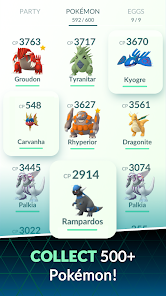
Pokémon GO has many key mechanics. Catching is the main one. You throw a Poké Ball by swiping up on the screen. A colored circle shows how hard the catch is. Green is easy, and red is hard. You can use a Berry to make catching easier. A Razz Berry makes the Pokémon easier to catch. A Golden Razz Berry makes it much easier. You also earn Stardust and Candy for catching Pokémon. You use Candy to make your Pokémon stronger. This is called powering up. You use Candy to evolve your Pokémon too. Evolving changes a Pokémon into a new form. For example, Pikachu evolves into Raichu. Some Pokémon need special items to evolve. You get these items from PokéStops. The game has special events often. Events can give you more Pokémon or different Pokémon. There are also Community Days. On Community Days, one specific Pokémon appears a lot. This helps you catch many of them.
Pokémon GO has in-app purchases. You can buy PokéCoins with real money. PokéCoins are the game's currency. You use PokéCoins to buy items in the shop. Items include more Poké Balls, Incense, and Lucky Eggs. Incense makes Pokémon come to you. Lucky Eggs double your experience points for 30 minutes. You can also get PokéCoins for free. You get them by leaving your Pokémon in Gyms. The game does have ads. You see ads if you tap on certain sponsored features. For example, some PokéStops are sponsored by companies. Tapping them might show an ad. The game is free to download and play. You can find Pokémon GO on both the Google Play Store and the Apple App Store. Many people play it all over the world. It is a fun way to go outside and explore. You can play with friends too. You can trade Pokémon with friends or battle them. Trading requires you to be near your friend. The game encourages walking and exploring new places.
Questions You Might Have
Is Pokémon GO free to play?
Yes, Pokémon GO is free to download and play. You can catch Pokémon, visit PokéStops, and battle at Gyms without spending money. The game makes money through optional in-app purchases. You can buy a virtual currency called PokéCoins. You use PokéCoins to buy items like extra Poké Balls or Incense. You can also earn PokéCoins slowly for free by defending Gyms.
Do I have to walk around to play?
Yes, walking is a core part of Pokémon GO. The game uses your phone's GPS. Pokémon and items appear at real-world locations. To find them, you need to move around. You can hatch Eggs by walking certain distances. Some features, like trading or battling friends, also require you to be near them. You can play a little from home if a Pokémon or PokéStop is nearby, but to really play, you need to go outside.
Does Pokémon GO have a lot of ads?
Pokémon GO does not have frequent, interrupting video ads like some free games. The main ad-like content comes from sponsored locations. Some PokéStops or Gyms are sponsored by businesses. When you interact with them, you might see a promotional image or logo for that company. This is the primary way ads appear in the game. You won't see ads between catches or while battling.
Can I play Pokémon GO on any phone?
You can play Pokémon GO on most modern Android and Apple phones. It is available on both the Google Play Store and the Apple App Store. Your phone needs a good internet connection (Wi-Fi or mobile data) and GPS. The game also uses your camera for AR features. Very old phones might not be able to run the game smoothly. You should check the store listing for the latest required phone specifications.
Is the game too hard for new players now?
No, Pokémon GO is not too hard for new players. The basic idea of catching Pokémon is still simple. The game has tutorials to help you start. Many common Pokémon are easy to find. The game can seem big because it has added many features over years, like Raids or Trading. But you can ignore these at first and just focus on catching. You can learn the extra parts slowly as you play. The community is also helpful for new players.
Download Apk File
Disclaimer
1 . Zebratests does not represent any developer, nor is it the developer of any App or game.
2 . Zebratests provide screenshots, historical version Apk, links and other information, which we collected from Google Play. We will also add our own reviews to provide users with more information to choose.
3 . All trademarks, registered trademarks, product names and company names or logos appearing on the site are the property of their respective owners.
4 . Zebratests abides by the federal Digital Millennium Copyright Act (DMCA) by responding to notices of alleged infringement that complies with the DMCA and other applicable laws.
5 . We guarantee the security of apk files downloaded from our site and also provide the official download link at Google Play Store and App Store.
6 . If you are the owner or copyright representative and want to delete your information, please contact us [email protected].
7 . All the information on this website is strictly observed all the terms and conditions of Google Ads Advertising policies and Google Unwanted Software policy.