






Music Monster: Horror DIY


Installs
1M+Category
MusicContent Rating
Teen
Screenshots
Editor's Review
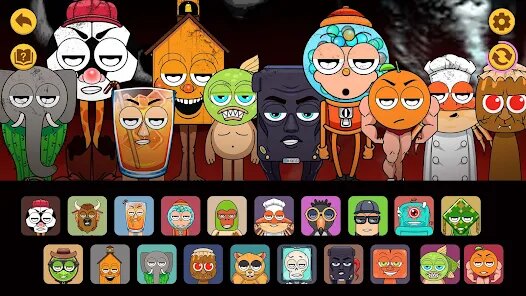
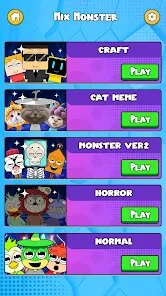
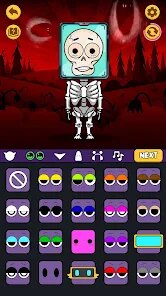
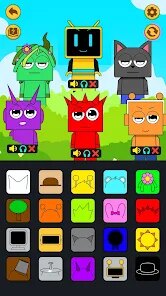
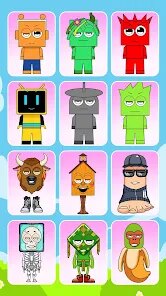
Music Monster: Horror DIY is a fun mobile game where you create your own monster and make music. You start by picking a monster base. Then, you add different parts like eyes, mouths, and arms. Each part you add makes a new sound. You can tap on your monster to hear the sounds play together. It's like building a musical instrument that looks like a silly monster. The game is very easy to learn. When you open it, you see your monster in the middle of the screen. At the bottom, there are buttons for different monster parts. You just tap a part and then tap on your monster to add it. The game shows you how to do everything with simple pictures. There is no complicated tutorial. You can just start playing right away. The main screen is clean and simple. Your monster is in the center. Below it, you see rows of parts you can use. There are eyes, mouths, hats, and tools. On the top of the screen, you see buttons for saving your monster or starting a new one. Tapping a part shows its name. When you add a part to your monster, it makes a sound. You can add many parts to make a complex song. The game lets you record the sounds your monster makes. You can save these recordings to listen to later. This is the main fun part of the game. You experiment with different combinations to create funny music. The game does have in-app purchases. You can buy new packs of monster parts. These packs have special eyes, mouths, and other items. You buy them with real money. The game also shows ads. Sometimes an ad video plays after you finish making a recording. You can close the ad after a few seconds. Music Monster: Horror DIY is available for download on the Google Play Store. You can find it by searching for the name. It is not available on the Apple App Store for iPhone users. You need an Android phone or tablet to play this game.
Playing Music Monster: Horror DIY feels like being a mad scientist who makes music. The core idea is mixing and matching. You aren't just drawing a monster; you are building a living soundboard. Every new arm or strange eye changes the melody. This turns creation into a game of discovery. You never know exactly what sound a new part will make until you try it. This encourages lots of experimentation. The controls are all based on touch. You drag parts from the menu and drop them onto your monster's body. If you don't like a part, you can tap it again to remove it. The game automatically saves your latest monster. You can have only one monster at a time unless you pay for more slots. The recording feature is simple. You press a red button, tap your monster to make sounds, and then press stop. You can play back your recording immediately. It's a very direct and satisfying loop: create, record, listen. The items in the game are mostly cosmetic but have unique sounds. A googly eye might make a boing sound. A vampire mouth could make a spooky laugh. There are also tool parts, like a wrench or a saw, that make mechanical noises. Unlocking all parts takes time or money. The game uses a energy system for some actions, which can limit play time. You can watch ads to get more energy. This is how the game makes money from players who don't pay. The presence of ads and purchases is clear but not too pushy. They are options on the side, not blocking your main play. For Android users, it's a free download with optional extras. The developer, Amusing Critters Game, has made similar creative apps. This game fits right in with their style of simple, amusing digital toys.
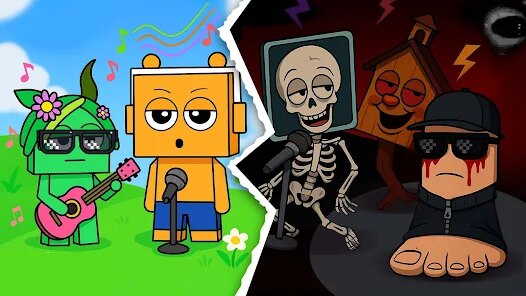
The long-term appeal of Music Monster: Horror DIY comes from its creativity. It's not a game you win or lose. It's a digital toy for making noise and having fun. The horror theme is light and cartoonish, not scary. The monsters look silly, not frightening. This makes it good for all ages. The sound quality of the parts is surprisingly good for a mobile game. The noises are clear and distinct. Mixing them creates chaotic but often catchy tunes. The game interface is designed for short play sessions. You can open it, make a quick monster, record a ten-second song, and close it. It's perfect for waiting in line or taking a short break. The social aspect is limited. You can save your recordings to your device, but you can't easily share them in the game. You would have to use your phone's sharing features. This keeps the game simple but might limit its reach. The game's performance is smooth on most modern Android devices. It doesn't require a powerful phone. The graphics are bright and colorful, with a hand-drawn style. The music and sound effects from the menu are cheerful. Overall, Music Monster: Horror DIY delivers exactly what it promises: a simple, amusing tool to build musical monsters. Its strength is in its straightforward, hands-on gameplay. Its weakness is its reliance on ads and purchases for the full experience. For a free game on Google Play, it offers a good amount of creative fun without any pressure. It's a great choice for someone who likes to tinker and create without following strict rules.
Questions You Might Have
What kind of game is Music Monster: Horror DIY?
It is a creative sandbox game. You build a cartoon monster by adding different body parts. Each part makes a unique sound. When you tap your finished monster, all the sounds play together to create music. It's more of a digital toy than a traditional game with levels or scores.
Is the game difficult to play?
No, it is very easy. The controls are simple touch and drag. There are no complex rules to learn. You just pick parts and put them on your monster. The game is designed for instant fun. Anyone, including young children, can understand how to play it within seconds.
Where can I download Music Monster: Horror DIY?
You can download it for free from the Google Play Store on Android devices. Search for "Music Monster: Horror DIY" or "Amusing Critters Game" to find it. It is not available on the iPhone App Store. You need an Android phone or tablet to install and play this game.
Does the game have ads or in-app purchases?
Yes, it has both. The game shows video ads, usually after you finish recording a sound. You can skip them after a short wait. There are also in-app purchases. You can buy packs of special monster parts with real money. The game uses an energy system, and you can watch ads to get more energy for free.
What do you do in the game after making a monster?
The main activity is creating and recording. After you build a monster, you can tap it to hear its symphony of sounds. You can use the record button to save a song you make by tapping different parts. You can also take screenshots of your creations. The fun is in experimenting with new part combinations to discover weird and funny musical results.
Download Apk File
Disclaimer
1 . Zebratests does not represent any developer, nor is it the developer of any App or game.
2 . Zebratests provide screenshots, historical version Apk, links and other information, which we collected from Google Play. We will also add our own reviews to provide users with more information to choose.
3 . All trademarks, registered trademarks, product names and company names or logos appearing on the site are the property of their respective owners.
4 . Zebratests abides by the federal Digital Millennium Copyright Act (DMCA) by responding to notices of alleged infringement that complies with the DMCA and other applicable laws.
5 . We guarantee the security of apk files downloaded from our site and also provide the official download link at Google Play Store and App Store.
6 . If you are the owner or copyright representative and want to delete your information, please contact us [email protected].
7 . All the information on this website is strictly observed all the terms and conditions of Google Ads Advertising policies and Google Unwanted Software policy.