










Magic Tiles 3


Installs
500,000,000+Category
MusicContent Rating
Rated for 3+
Screenshots


Editor's Review
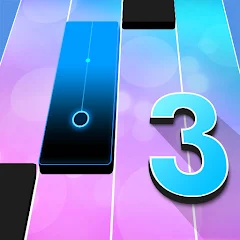
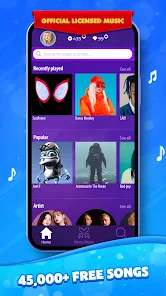
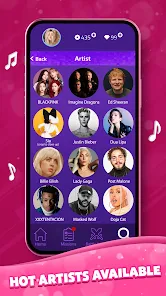
Magic Tiles 3 is a fun music game for your phone. You tap black tiles that move down the screen to the beat of songs. The goal is simple: don't miss any black tiles and never hit a white one. It feels like playing a piano. The game starts with easy songs to learn. You just tap when the tile reaches the bottom line. It's very easy to pick up and play for a few minutes. The main screen shows your song library. You can see all the songs you own. There is a shop to buy more songs and a leaderboard to see your scores compared to other players. The play screen is just the falling tiles and the music.
The main game mechanic is timing your taps perfectly. Each song is a stream of black tiles you must hit. If you miss a black tile, the song ends. If you accidentally tap a white tile, the song also ends. Your score is based on how many notes you hit correctly in a row. Longer combos give higher scores. You can earn coins by playing songs. These coins let you buy new songs in the game's shop. There are thousands of songs available, from pop hits to classical music. You start with a few free ones. The game gets faster and more complex on harder songs, with more tiles coming at you quickly.
Magic Tiles 3 has in-app purchases. You can buy coin packs with real money to unlock songs faster. The game also shows ads. You will see video ads sometimes after finishing a song or if you want to continue after failing. You can play Magic Tiles 3 on both the Google Play Store for Android phones and the App Store for iPhones. It is a very popular game for music lovers. It tests your rhythm and finger speed. While the ads can be annoying, the core gameplay of tapping to music is enjoyable and relaxing. Magic Tiles 3 is a great choice if you like simple, music-based challenge games.
Questions You Might Have
Is Magic Tiles 3 hard to play?
It starts very easy. The first songs are slow and teach you how to play. The difficulty increases with more songs. Hard songs are very fast and require quick reflexes. But you can always practice on easier levels.
How do I get more songs in Magic Tiles 3?
You earn coins by playing. Use coins to buy new songs in the shop. You can also watch ads to get some coins. If you want songs quickly, you can buy coin packs with real money through in-app purchases.
Can I play Magic Tiles 3 offline?
Yes, you can play the songs you have already downloaded without an internet connection. You need internet to download new songs or watch ads for rewards.
Are the ads in Magic Tiles 3 annoying?
You will see video ads, usually after you finish a song or if you choose to continue after failing. They can interrupt the flow. Some players find them bothersome, but they are part of the free game experience.
Where can I download Magic Tiles 3?
You can get Magic Tiles 3 from the Google Play Store if you have an Android phone. If you have an iPhone, you can download it from the Apple App Store. The game is free to download on both platforms.
Download the App
Disclaimer
1 . Zebratests does not represent any developer, nor is it the developer of any App or game.
2 . Zebratests provide screenshots, historical version Apk, links and other information, which we collected from Google Play. We will also add our own reviews to provide users with more information to choose.
3 . All trademarks, registered trademarks, product names and company names or logos appearing on the site are the property of their respective owners.
4 . Zebratests abides by the federal Digital Millennium Copyright Act (DMCA) by responding to notices of alleged infringement that complies with the DMCA and other applicable laws.
5 . We guarantee the security of apk files downloaded from our site and also provide the official download link at Google Play Store and App Store.
6 . If you are the owner or copyright representative and want to delete your information, please contact us [email protected].
7 . All the information on this website is strictly observed all the terms and conditions of Google Ads Advertising policies and Google Unwanted Software policy.